GA4 modelling in dbt & Snowflake
I am going to give you an overview with tips and explanations, followed by specific code snippets you can use and I will end with key / tricky raw fields you might wanna watch out for!

The approach I describe below processes over 10M events every day, passing through 21 different (incremental!) tables. It takes between 13 and 15 minutes to compute with a warehouse of size S.
Overal modelling suggestions
It generally follows Kimball’s with a few small tweaks and additions. Volumes are huge so I recommend making it ALL INCREMENTAL.
Have a look below at the proposed, high level architecture, that I found working really well:
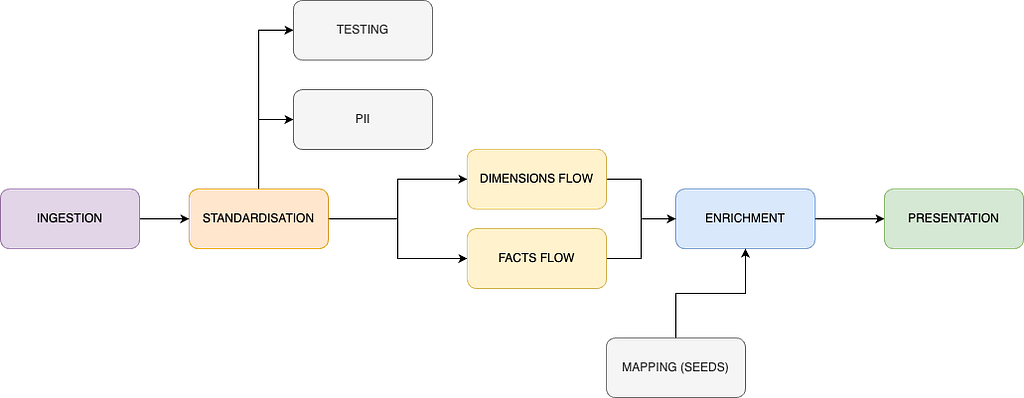
- Ingestion — use one of your choice, for me it is export to S3 and then Snowpipe which works really well.
- Standardisation — extremely useful place, where you can flatten your data (likely needed) but also change names of all the custom dimension fields, convert your timestamps and and add some first layer definitions, which will be used later across many models.
- Testing — I recommend a separate, tiny model dedicated for testing only, with automated deletion of fields. This is to ensure that neither your compute nor storage costs are skyrocketing (really easy with GA…).
- PII — I recommend a separate place to store PII information along with a retrieval key. Helps with compliance and deletion requests.
- Dimensions / Facts flow -> build the first stages of your data around your stakeholders requests. Now that you standardised everything it will become much easier to create these first layer structures. I recommend heavy transformations and joins to go exactly there.
- Enrichment + Mapping -> I recommend creating some mapping tables from seeds (eg. for channel, country, device or any other mapping where you would usually apply a long CASE statement). You can apply these mappings to any place in the pipeline you want, ensuring you always have a single source of truth. Performance-wise it works really well with Snowflake indexing.
- Presentation — this layer depends heavily on the consumers of your data. If it is solely your BI tool — optimise for its read (eg. Tableau extracts struggle over 25GB). If you have external consumers (eg. front end, data shares) — then I recommend you also implement data contracts to ensure integrity of what you’re producing for them. It goes without saying that no heavy joins nor transformations should be happening here.
Pro Tips:
- Once you read GA data as source in your dbt project, make sure you read incrementally from the source as well (custom snippets are provided below). It might prove tough based on your CI approach, but it is feasible — let me know if you want a separate article about setting this up all nice and lean.
- Getting session level data (first and last values) is likely going to be one of the most expensive processing across your pipeline. Separate it such that you bring all required raw values to the session level first and only in the subsequent model enrich the data — works like a charm!
- Plan for failure and reloads — this data has a tendency to be buggy; when coupled with frequently changing marketeers’ requirements, you can be sure of one thing -> you will be reloading this data more often than your other incremental pipelines.
Code snippets you can use in your dbt deployment
Testing model SQL definition
-- setting incremental keys

{%- set lookback_window_in_days = config.get('lookback_window_in_days', default='1') -%}

-- starting table processing

with ga_4_source as  (

    {{ ga_incremental_source_loading('<schema_name>', '<model_name>', this, lookback_window_in_days) }}

)

-- Conditionally delete old records if this is an incremental run
{% if is_incremental() %}
  {{ ga_testing_automated_cleanup('<model_name>', '<schema_name>', '<n_delete_days>') }}
{% endif %}

select

    *,
    {{ dbt_utils.generate_surrogate_key(['hit_id' , 'ga_session_id'
                                        , 'stream_id', 'event_name', 'event_timestamp_converted']) }} as surrogate_key

from ga_4_source

where 1=1 -- this part could be avoided but is added for readability of the incremental block below

    {% if is_incremental() %}

        -- this part allows to do a partial backfill by specifying as a variable
        -- number of backfill days required
        -- accepts --vars '{\"custom_lookback_window_in_days\":\"<number>\"}'")
        -- eg.: dbt run --select <model_name> --vars '{"custom_lookback_window_in_days":"10"}'
        {% if var('custom_lookback_window_in_days',none) %}

        and ga_4_source.event_date_converted > (
                                                        select date_trunc(
                                                                            day
                                                                            , dateadd(day, -'{{ var("custom_lookback_window_in_days") }}'::int
                                                                            , max(t.event_date_converted))
                                                                            ) from {{ this }} t
                                                        )

        {% else %}

        and ga_4_source.event_date_converted > (
                                                        select date_trunc(
                                                                            day
                                                                            , dateadd(day, -{{ lookback_window_in_days }}::int
                                                                            , max(t.event_date_converted))
                                                                            ) from {{ this }} t
                                                        )

        {% endif %}

    {% endif %}
-- additional safety feature limiting result to only 1000 rows - if someone accidentally does a full refresh
limit 1000
GA_TESTING_AUTOMATED_CLEANUP macro
{% macro ga_testing_automated_cleanup(model_name, schema_name, delete_cutoff_in_days) %}

    {% if target.name == 'prod' %}
        {% set delete_statement %}
            delete from {{ schema_name }}.{{ model_name }}
            where event_date_converted < (select date_trunc(
                                                                day
                                                                , dateadd(day, -{{ delete_cutoff_in_days }}::int
                                                                , max(t.event_date_converted))
                                                                ) from {{ schema_name }}.{{ model_name }} t);
        {% endset %}

        {{ log("Executing: " ~ delete_statement, info=True) }}

        {% do run_query(delete_statement) %}

    {% endif %}

{% endmacro %}
Testing model YAML definition
I recommend using dbt codegen package to help you generate YAML documentation. Below you will find a tip for generating documentation and below the actual YAML of the testing model. I have applied there data contracts only — you can adjust with the specific tests based on your use case.
Pro TIP:
I found it easiest to create a .sql file in analyses folder, with the following definition:
-- If you need to create documentation for a new model
-- insert it's name, enable the model (set to true)
-- execute: dbt compile --select <this_file_name>
-- copy paste auto-generated documentation from your terminal
-- if it is too long then use > operator to write output into a file of your choice

{{ config(
  enabled=false
) }}

{{ codegen.generate_model_yaml(
     model_names=['<model_name>']
) }}
version: 2

models:
  - name: <model_name>
    description: "<your_description>"
    config:
      materialized: incremental
      incremental_strategy: delete+insert
      on_schema_change: append_new_columns
      unique_key: surrogate_key
      contract:
        enforced: true
        # lookback parameter defines how many days in the past are we reloading on a daily basis
        # it can be customly changed if required on an adhoc basis
        # custom usage documented directly in the model
      lookback_window_in_days: 1

# here we have to continue with columns definition
# since the list is long and keeps updating - you must handle this on your own
Custom lookback reload snippet
You can implement this snippet to allow yourself to simply pass additional vars to your production execution whenever you want to do a reload for a custom number of days. This is based on the assumption that lookback window in days is provided in the YAML config of the model (eg. lookback_window_in_days: 1)and has a default value read at the beginning of the model:
-- setting incremental keys

{%- set lookback_window_in_days = config.get('lookback_window_in_days', default='1') -%}

-- starting table processing

-- here goes your model read logic

-- here we add the incremental clause
{% if is_incremental() %}

        -- this part allows to do a partial backfill by specifying as a variable
        -- number of backfill days required
        -- accepts --vars '{\"custom_lookback_window_in_days\":\"<number>\"}'")
        -- eg.: dbt run --select <model_name> --vars '{"custom_lookback_window_in_days":"10"}'
        {% if var('custom_lookback_window_in_days',none) %}

        and ga_4_source.event_date_converted > (
                                                        select date_trunc(
                                                                            day
                                                                            , dateadd(day, -'{{ var("custom_lookback_window_in_days") }}'::int
                                                                            , max(t.event_date_converted))
                                                                            ) from {{ this }} t
                                                        )

        {% else %}

        and ga_4_source.event_date_converted > (
                                                        select date_trunc(
                                                                            day
                                                                            , dateadd(day, -{{ lookback_window_in_days }}::int
                                                                            , max(t.event_date_converted))
                                                                            ) from {{ this }} t
                                                        )

        {% endif %}

    {% endif %}
Key / tricky raw fields
Event timestamp
even_timestamp is provided in microseconds, therefore it has to be parsed somehow, to make it compliant with Snowflake functions. Below an example of getting it to milliseconds:
to_timestamp_ntz(event_timestamp / 1000, 3)
We divide by 1000 to achieve milliseconds value and we parse “3” as a second argument to inform Snowflake of the scale of the numeric value such that it can be parsed correctly. For seconds use “0” and for nanoseconds use “9” (Snowflake documentation — scale factor).
Last thing you might want to do is to convert the timezone — originally event_timestamp is provided in UTC.
User ID
user_pseudo_id, provided by Google, contains PII. You might want to anonymise it with sha2() or another hashing algorithm. Think twice before you model this data — when, where and what for are you going to use it. I don’t have to remind you oof all the hefty fines for mishandling user’s personal information!
User engagement
engagement_time_msec is the field provided by Google. You might want to bring it up to seconds, for example:
ceil(engagement_time_msec::int / 1000)
Google will track the actual engagement time of the user, meaning any distraction from the tab, moving app to the background etc will stop the count and send the value to the GA engine. For detailed documentation, check here.
Contact Me
Thanks for reading. Are you liking the information received but lacking time or skillset to get your analytics engineering sorted? Check out my contact details.
GA4 modelling in DBT & Snowflake was originally published in Lortech Solutions Blog on Medium, where people are continuing the conversation by highlighting and responding to this story.