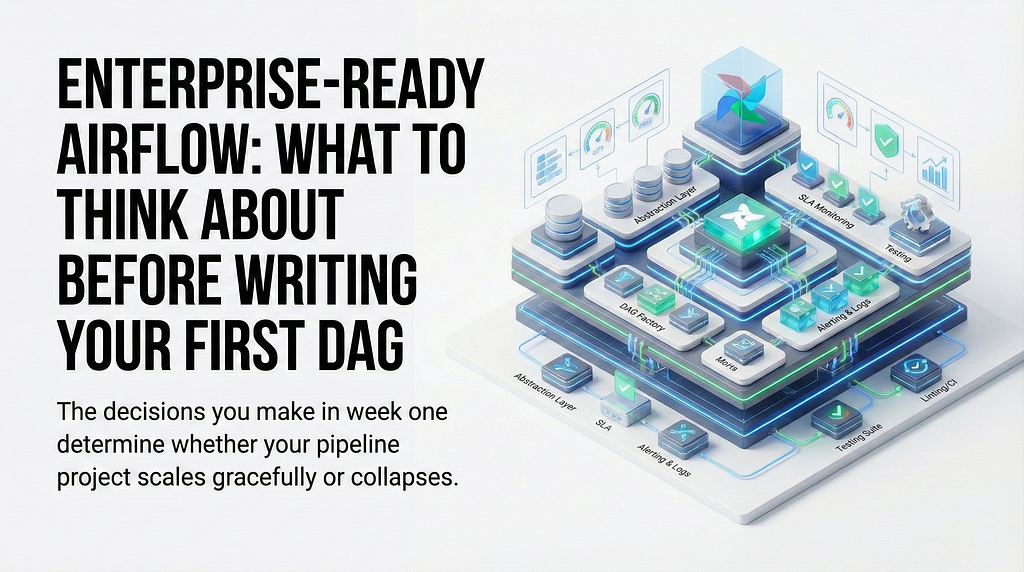
The decisions you make in week one determine whether your pipeline project scales gracefully or collapses under its own weight twelve months later
There is a particular kind of Airflow project that most data engineers have either lived through or heard about. It starts cleanly: a handful of DAGs, a clear purpose, a small team. Then requirements change. New data sources appear. Stakeholders want more pipelines, faster. Someone adds a workaround here, a copy-pasted DAG there. Within a year, the codebase is a maze of duplicated logic, inconsistent naming, no monitoring, and tests that exist only in theory. Deploying a change feels like defusing a bomb.
The frustrating part is that most of this is avoidable. Not by writing perfect code from day one, but by making a small number of structural decisions before writing the first DAG. This article is about those decisions.
Requirements Will Change, Faster Than You Expect
Every Airflow project I have seen starts with assumptions that turn out to be wrong. The pipeline that was supposed to run once a day now needs to run hourly. The source that was supposed to be stable starts changing its schema. The team that was three people becomes ten, and suddenly “everyone just knows how things work” stops being a viable documentation strategy.
This is not a failure of planning. It is the nature of data engineering in organizations that are actually using their data. The question is not how to prevent requirements from changing. It is how to build a system that absorbs change without requiring a rewrite every time.
The answer is abstraction, and the time to introduce it is before you have ten DAGs that all do things slightly differently.
The most common trap is writing DAGs as self-contained scripts. Each DAG defines its own connection handling, its own retry logic, its own notification behavior. It works fine until you need to change how retries work across all pipelines, and now you are making the same change in forty places.
Instead, treat your Airflow project as a Python package with real software engineering practices. Extract shared behavior into base classes and utility functions. Define a standard DAG factory that encodes your defaults. When requirements change, you change the factory, and every DAG that uses it gets the update for free.
A minimal example of what this looks like in practice:
# pipelines/factory.py
from airflow import DAG
from datetime import datetime
from pipelines.callbacks import notify_on_failure

DEFAULT_ARGS = {
        "owner": owner,
        "retries": 2,
        "retry_delay": timedelta(minutes=5),
        "on_failure_callback": notify_on_failure,
    }

def create_dag(
    dag_id: str,
    schedule: str,
    owner: str,
    tags: list[str],
    **kwargs
) -> DAG:
    default_args = kwargs.get('default_args', DEFAULT_ARGS)
    return DAG(
        dag_id=dag_id,
        schedule=schedule,
        start_date=datetime(2024, 1, 1),
        default_args=default_args,
        tags=tags,
        catchup=False,
        **kwargs,
    )
Every DAG in your project calls create_dag(). Retry logic lives in one place. Failure callbacks live in one place. When you need to add query tagging, or change the default retry count, or swap out the notification system, you change one file.
This feels like unnecessary abstraction when you have two DAGs. It feels like a lifesaver when you have fifty.
SLA
Nobody wants to spend a project kickoff talking about SLAs. It feels premature, bureaucratic, and removed from the actual work of building things. Skip it, and you will have a much worse conversation six months later when a stakeholder asks why a pipeline failed silently for three days and nobody noticed.
SLA in the context of Airflow is not just “how fast does the pipeline need to run.” It is a set of agreements that drive concrete engineering decisions. Before writing the first DAG, it is worth nailing down at least the following:
What is the acceptable latency for each pipeline? A pipeline that feeds a real-time dashboard has different requirements than one that populates a weekly report. This determines scheduling, timeout settings, and how aggressively you need to optimize.
What is the acceptable failure rate? Some pipelines can tolerate occasional failures and catch up on the next run. Others cannot miss a single execution. This determines your retry strategy, alerting thresholds, and whether you need backfill logic.
Who needs to be notified when something breaks, and how quickly? “The team will notice” is not an SLA. Define a concrete escalation path: which failures go to Slack immediately, which generate a ticket, which require a page. This conversation forces stakeholders to actually prioritize.
What counts as a breach? A DAG that runs but produces incorrect output is worse than a DAG that fails loudly. Agreeing on what “working correctly” means before you build the pipeline is much easier than agreeing on it after an incident.
Airflow has native SLA miss functionality — you can set sla on individual tasks and Airflow will call a callback when a task exceeds its expected duration. This is worth wiring up from the start, because adding SLA monitoring to a running production pipeline is one of those things that always gets deprioritized.
from datetime import timedelta

with create_dag("orders_pipeline", schedule="@hourly", owner="data-eng", tags=["orders"]) as dag:
    transform = PythonOperator(
        task_id="transform_orders",
        python_callable=transform_orders,
        sla=timedelta(minutes=30),  # alert if this task takes longer than 30 min
    )
Having these conversations early also helps with a subtler problem: expectation management. Stakeholders who helped define the SLA are stakeholders who understand why an incident happened and what it means. Stakeholders who were never consulted tend to assume the system should be perfect.
Monitoring
An Airflow DAG that fails silently is worse than no DAG at all, because it creates the illusion that the pipeline is running. Monitoring is not optional in a production environment. The question is only how to implement it well.
The starter pattern is to wire failure callbacks to Slack and email at the DAG factory level, so every pipeline gets notifications without any per-DAG configuration. The callback receives a context object from Airflow that contains everything you need to build a useful alert.
# pipelines/callbacks.py
from airflow.hooks.base import BaseHook
from slack_sdk import WebClient

def notify_on_failure(context):
    dag_id = context["dag"].dag_id
    task_id = context["task_instance"].task_id
    execution_date = context["execution_date"]
    log_url = context["task_instance"].log_url
    client = WebClient(token=BaseHook.get_connection("slack_default").password)
    client.chat_postMessage(
        channel="#data-alerts",
        text=(
            f":red_circle: *Pipeline failure*\n"
            f"*DAG:* `{dag_id}`\n"
            f"*Task:* `{task_id}`\n"
            f"*Run:* `{execution_date}`\n"
            f"<{log_url}|View logs>"
        ),
    )
A few things make the difference between monitoring that is actually useful and monitoring that people learn to ignore. First, every alert should include a direct link to the logs. An alert that requires three clicks before you can see what went wrong creates friction that leads to alerts being dismissed. Second, alerts should be routed by severity and ownership. A failure in a pipeline owned by the finance team should go to the finance team’s channel, not a generic #data-alerts channel that nobody reads during the day. Third, retry noise is a real problem. If a task retries twice before succeeding, you do not want two failure alerts followed by a success alert. Configure your callbacks to only fire on the final failure, after retries are exhausted.
Beyond failure alerts, consider tracking DAG duration over time. A pipeline that used to run in ten minutes and now takes forty minutes is not failing, but something is wrong. Airflow exposes this data via its metadata database, and it is worth building a simple dashboard or periodic check that flags pipelines whose runtime is drifting upward.
Testing
Testing Airflow pipelines is more environment-dependent than testing most software, and pretending otherwise leads to advice that does not generalize. A team running Airflow on Astronomer has different options than a team running it on MWAA or a self-hosted Kubernetes cluster. Rather than prescribing a specific framework, here are the principles that hold across environments.
Test your Python, not Airflow. The most reliable tests are the ones that test the business logic inside your operators and callables in complete isolation, with no Airflow runtime involved at all. If your transform_orders function contains logic worth testing, write a unit test for that function. Mock the database connections. Assert on the output. These tests are fast, stable, and environment-independent.
Test DAG structure separately from DAG execution. Airflow provides utilities to import and inspect DAG objects without running them. Use these to assert that a DAG has the expected tasks, the expected dependencies, and the expected configuration. This catches a wide class of bugs before deployment without needing a running Airflow environment.
# tests/test_dag_structure.py
from airflow.models import DagBag

def test_orders_dag_loads():
    dagbag = DagBag(dag_folder="dags/", include_examples=False)
    assert "orders_pipeline" in dagbag.dags
    assert len(dagbag.import_errors) == 0

def test_orders_dag_task_count():
    dagbag = DagBag(dag_folder="dags/", include_examples=False)
    dag = dagbag.dags["orders_pipeline"]
    assert len(dag.tasks) == 3
Be honest about integration tests. Full end-to-end tests that run DAGs against real infrastructure are valuable, but they are also slow, fragile, and expensive to maintain. In most teams, the right answer is a small number of carefully chosen integration tests that cover critical paths, not comprehensive coverage of every DAG. Define the boundary clearly so the team knows what the test suite does and does not guarantee.
Linting
Code review catches bugs, but it does not scale as a mechanism for enforcing consistency. As a team grows, “we agreed on the conventions” becomes “we sort of remember the conventions” becomes “everyone does it slightly differently.” Linting automates the enforcement so that conventions do not depend on reviewers remembering to check.
For Airflow projects, which are Python at their core, the tooling is mature and well worth the setup cost.
Ruff is the current standard for Python linting and formatting. It is significantly faster than flake8 or pylint, covers a broad set of rules, and handles both linting and formatting in a single tool. For an Airflow project, the key rules to enable include import order enforcement, unused import detection, and complexity checks that flag DAGs or callables that are getting too large.
Pre-commit hooks run linting automatically before each commit. The value here is not just catching issues earlier — it is removing the need to remember to run the linter manually. A developer who sets up pre-commit once never has to think about it again.
# .pre-commit-config.yaml
repos:
  - repo: https://github.com/astral-sh/ruff-pre-commit
    rev: v0.4.4
    hooks:
      - id: ruff
        args: [--fix]
      - id: ruff-format
One honest caveat here: pre-commit integrations do not always play well with every Airflow deployment environment. Teams have encountered issues with specific hook versions conflicting with the Python environment that Airflow runs in, leading to hooks that either fail to install or behave unpredictably. The solution is to be conservative with hook versions, pin everything explicitly, and test the full pre-commit setup in a clean environment before rolling it out to the team. If a specific hook causes persistent problems, remove it and run that check in CI instead — a linter that runs in CI but not locally is still far better than a linter that runs nowhere.
The goal is not to have the most comprehensive linting setup. It is to have a setup that is stable, that the team actually uses, and that enforces the subset of rules that matter most for your codebase.
Putting It Together
None of these decisions are complicated in isolation. The challenge is that they all need to happen before the project has momentum, when it feels like you are slowing down to do things that could be deferred.
The cost of deferring them is not obvious until it is too late. An Airflow project without a DAG factory is a project where changing default retry behavior requires touching every DAG file. A project without defined SLAs is a project where every incident becomes a negotiation about expectations. A project without monitoring is a project where failures are discovered by users before they are discovered by the team.
Build the structure before you need it. The first week is the cheapest time to do it. And the teams that do it consistently are the ones who are still shipping quickly two years in, while everyone else is talking about the rewrite.
Joachim Hodana - Software & Data Engineer
Enterprise-Ready Airflow: What to Think About Before Writing Your First DAG was originally published in Lortech Solutions Blog on Medium, where people are continuing the conversation by highlighting and responding to this story.